
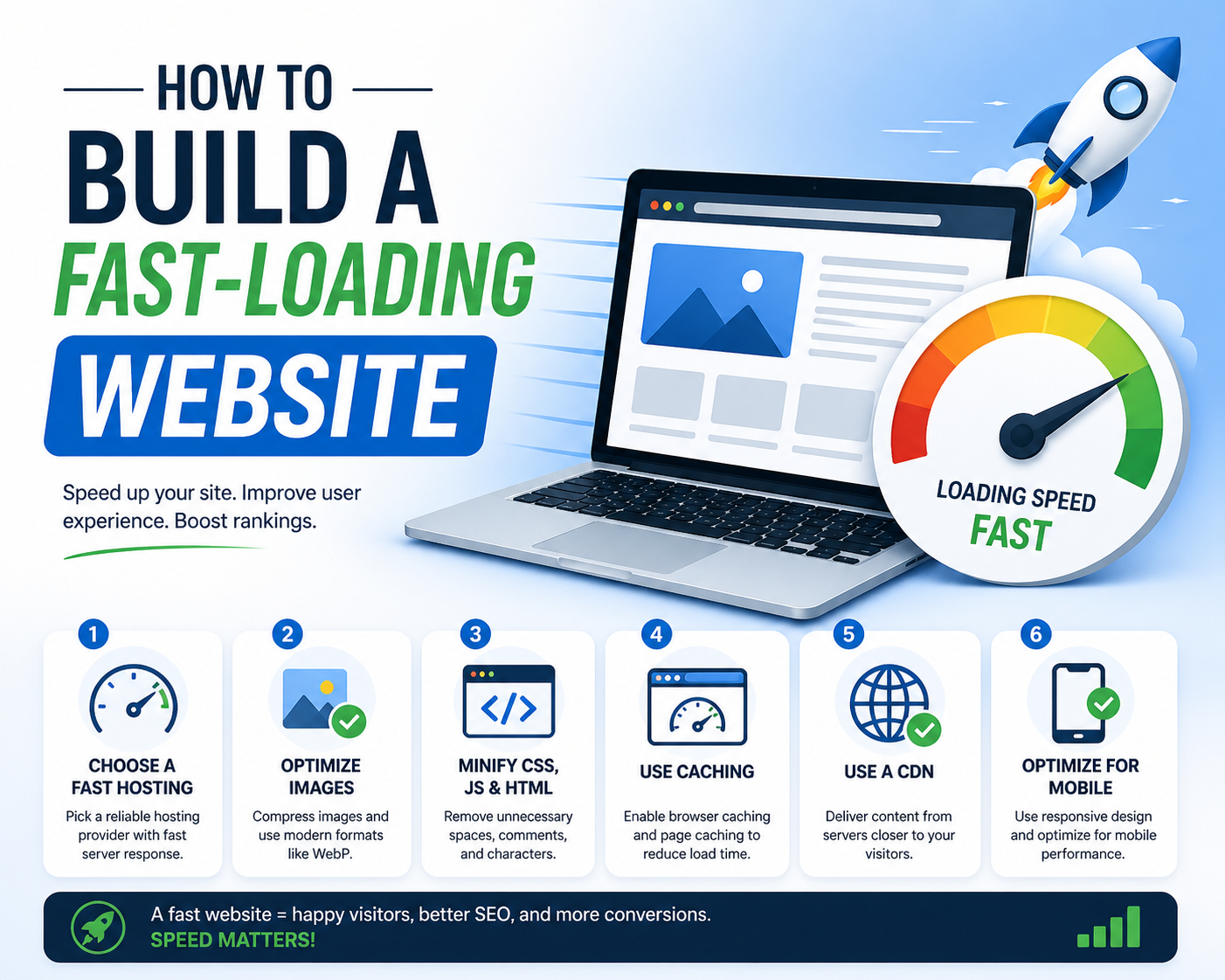
How to Build a Fast-Loading Website
Understanding the Importance of Website Speed
Website speed is a crucial aspect of any online presence, directly influencing both user experience and search engine optimization (SEO). In today’s fast-paced digital landscape, users have grown increasingly impatient with slow-loading websites. Research indicates that even a one-second delay in load time can lead to a 7% reduction in conversions. This statistic underscores the importance of optimizing website speed to enhance user retention and maximize potential sales or interactions.
Moreover, the impact of website speed extends beyond user engagement. Search engines like Google consider page speed as a significant ranking factor in their algorithms. A slow-loading site may lead to lower search engine rankings, which can result in diminished visibility and organic traffic. In fact, studies have shown that 53% of mobile users will abandon a site if it takes longer than three seconds to load. This alarming statistic highlights the necessity of prioritizing website speed as a fundamental element of web development.
Furthermore, a faster website not only improves user satisfaction but also contributes to a higher overall site performance. Studies have shown that faster websites generate more page views, increase the average time spent on site, and ultimately boost conversion rates. By optimizing images, leveraging browser caching, and minimizing HTTP requests, website owners can enhance loading times, fostering a more enjoyable browsing experience. All these factors emphasize that website speed is not merely a technical consideration; it is a vital component of effective web strategy.
Analyzing Your Current Website Speed
Understanding your website’s current speed is a crucial step in enhancing performance. Various tools are available that can provide insight into your website’s loading time and overall speed scores. Two of the most widely recognized tools for this purpose are Google PageSpeed Insights, GTmetrix, and Pingdom.
To begin, Google PageSpeed Insights is an effective tool that assesses your site based on two key metrics: performance on mobile and desktop devices. Simply enter your URL in the search bar, and the tool generates a score on a scale of 0 to 100. Along with the score, Google offers valuable suggestions on how to improve your website speed, such as optimizing images and leveraging browser caching.
Next, we turn to GTmetrix, which provides a more comprehensive analysis of your website. After inputting your URL, GTmetrix not only gives a performance score but also details the time it takes to fully load your site. The tool breaks down multiple potential performance issues, including server response times, resource load times, and the effect of third-party scripts. This particular analysis allows for a thorough understanding of elements that can potentially slow down your website.
Pingdom is another useful option that evaluates your site’s speed from various locations around the globe, helping you gauge loading times from different user perspectives. After entering your URL, Pingdom will give you a performance grade, load time, and a detailed waterfall chart that visualizes each element’s contribution to the overall load time.
By leveraging these tools, you can obtain an accurate picture of your website’s speed and pinpoint areas where enhancements can be made. This essential analysis is the foundation for building a faster-loading website, ensuring that users enjoy an optimal browsing experience.
Choosing the Right Hosting Service
When it comes to building a fast-loading website, selecting a reliable web hosting service is critical. The impact of hosting on website speed cannot be underestimated, as it directly affects how quickly your site loads for users. There are various types of web hosting services available, each impacting website performance differently: Shared, VPS, Dedicated, and Cloud hosting.
Shared hosting is a popular choice for beginners and small websites due to its cost-effectiveness. However, it can lead to slower performance since multiple websites share the same server resources. This arrangement may result in sluggish load times, particularly if another site on the server experiences a spike in traffic.
Virtual Private Server (VPS) hosting offers a middle ground between shared and dedicated hosting. With VPS, your website is still hosted on a shared server, but you have dedicated resources that prevent other sites from affecting your site’s performance. This configuration results in improved speed and reliability compared to shared hosting, making it a suitable option for growing websites.
Dedicated hosting provides the highest level of performance as it allocates an entire server to a single website. This ensures maximum speed and responsiveness, making it ideal for websites that handle significant amounts of traffic or require robust performance for resource-intensive applications. The downside is that dedicated hosting comes with a higher price tag.
Cloud hosting, on the other hand, utilizes multiple servers, distributing resources efficiently to maintain optimal performance. This type of hosting enhances scalability and reliability, as it can accommodate traffic spikes without affecting loading times. Ultimately, the choice of hosting service depends on the specific needs of your website and your budget.
Optimizing Images and Media Files
In the quest to build a fast-loading website, optimizing images and media files is paramount. The visual appeal of a site is essential, yet it should not come at the cost of load times. To achieve an optimal balance, it is crucial to implement various strategies that enhance the performance of media assets.
One effective method is file compression, which reduces the size of images and video files without sacrificing quality. Tools such as Imageyork.com or TinyPNG can significantly decrease file sizes, leading to faster loading times. Developers should also be mindful of the file formats they select; JPEG is preferable for photographs due to its balance of quality and file size, whereas PNG is better suited for graphics that require transparency. Additionally, considering newer formats like WebP can offer superior compression ratios while maintaining visual fidelity.
Another critical technique is the implementation of lazy loading. This approach ensures that images and videos are loaded only when they enter the viewport, rather than loading all assets upfront. This not only minimizes initial load times but also conserves bandwidth for users who may not scroll through the entire page. Lazy loading can be achieved through various methods, including the use of native HTML attributes like loading="lazy" or JavaScript libraries that automatically defer media loading.
Moreover, it is wise to regularly audit and update media files on a website. Old, unused, or improperly optimized files can accumulate over time, negatively impacting load performance. Tools like Google PageSpeed Insights can help identify these issues and provide actionable recommendations for improvement. By focusing on these optimization techniques, website owners can create a visually engaging experience without compromising speed.
Minifying CSS, JavaScript, and HTML
Minification is an essential process aimed at reducing the size of CSS, JavaScript, and HTML files, thereby enhancing the performance of a website. The primary objective of minification is to eliminate unnecessary characters from the code without altering its functionality. These characters may include white spaces, line breaks, comments, and other extraneous elements that do not contribute to the execution of the code. By removing these elements, developers can significantly decrease file sizes, which directly translates to faster load times.
Faster loading times contribute not only to a better user experience but also positively impact search engine optimization (SEO). Search engines favor websites that load quickly, leading to improved rankings in search results. Therefore, minifying code is a crucial step in web development that should not be overlooked.
There are several tools and plugins available to assist in the minification process. For CSS and JavaScript, tools such as UglifyJS and CSSNano are among the most popular choices. These tools can automatically remove unnecessary characters and optimize code, ensuring it runs efficiently. Additionally, many modern web development frameworks and build systems, including Webpack and Gulp, come equipped with minification plugins to streamline this process during development and deployment.
For HTML, there are tools like HTMLMinifier which excel in optimizing HTML files to further decrease the total load time of web pages. Many content management systems (CMS) such as WordPress also offer plugins like Autoptimize and WP Fastest Cache that can perform minification automatically, making the process accessible even to less technical users.
In conclusion, minifying CSS, JavaScript, and HTML is a straightforward yet powerful technique to improve website performance. By utilizing the appropriate tools and plugins, web developers can ensure their sites are optimized for speed, contributing to both user satisfaction and better search engine rankings.
Leveraging Browser Caching
In the quest to enhance website performance and loading speeds, leveraging browser caching emerges as a critical strategy. Browser caching is a technique that stores web resources on users’ local devices, allowing subsequent visits to the site to load faster, significantly improving the overall user experience. When a visitor accesses a web page, certain elements such as images, stylesheets, and scripts are downloaded and stored in the browser’s cache. This means that these elements do not need to be fetched from the server on every visit, resulting in quicker load times.
To effectively implement browser caching, website administrators can utilize various methods, including setting cache-control headers and expiration dates. The Cache-Control HTTP header allows developers to define how long resources should be stored in the cache. By specifying a cache duration, often expressed in seconds, it becomes possible to optimize loading times significantly. For instance, static resources like images may have a longer cache duration than frequently updated content, ensuring users benefit from fast loading while still receiving fresh data.
Another vital aspect of caching is the Expires header, which sets an expiration date for cached content. While the Cache-Control header is more flexible and widely recommended, both headers can be utilized in tandem to facilitate efficient browser caching. Implementing server-side caching configurations, such as through .htaccess files on Apache servers, can also streamline caching practices.
Furthermore, utilizing Content Delivery Networks (CDNs) can enhance caching efficacy. CDNs store cached data across multiple servers globally, ensuring that users access resources from the nearest server location. This minimizes delays that typically occur due to long-distance data travel.
Using a Content Delivery Network (CDN)
In the modern digital landscape, ensuring swift delivery of website content is paramount for user experience and search engine ranking. A Content Delivery Network (CDN) plays a vital role in achieving this objective. A CDN is essentially a network of geographically distributed servers that work together to provide high availability and performance for delivering content to users. When a visitor accesses a website that utilizes a CDN, the request is routed to the nearest server in the network, thereby reducing latency and speeding up content retrieval.
One of the key benefits of employing a CDN is its ability to offload traffic from the website’s origin server. By caching static content—such as images, stylesheets, and JavaScript files—on multiple servers, a CDN minimizes the load on the origin server. This leads to improved website performance, especially during traffic spikes or peak usage hours. Additionally, a CDN can enhance data security by providing DDoS mitigation and ensuring secure data transmission, making it a compelling choice for businesses that prioritize customer trust and data protection.
When selecting a CDN provider, it is crucial to consider several key features. First, coverage area and server locations should be evaluated to ensure that the CDN can serve your target audience effectively across various geographic regions. Second, look for providers that offer robust analytics and reporting tools to track performance metrics, such as traffic spikes and cache hit ratios. Lastly, scalability is a critical factor; ensure the CDN can accommodate future growth of your website without significant disruptions.
Incorporating a CDN into your website’s infrastructure can significantly enhance loading speeds, thereby improving user satisfaction and engagement. Thus, it stands as a critical component in the strategy to build a fast-loading website.
Reducing Server Response Time
Server response time plays a crucial role in determining the overall speed of a website. It refers to the time taken by the server to respond to a client’s request for a webpage. A slow server response can lead to delays in loading, impacting user experience and search engine rankings. Therefore, optimizing server performance is essential for achieving a fast-loading website.
One of the primary ways to enhance server response time is by configuring the server effectively. This can include adjusting settings based on the specific needs of your website. For instance, utilizing caching mechanisms minimizes the data that needs to be processed by the server, allowing it to respond faster to user requests. Various caching solutions, such as page caching and object caching, can significantly reduce load times by storing frequently accessed data and serving it quickly.
Additionally, choosing the right server location can dramatically affect response times. A server positioned closer to your users will naturally result in faster loading times, as the distance data must travel is reduced. Utilizing a Content Delivery Network (CDN) is another strategy to improve performance by distributing server load and ensuring users access your site data from the nearest node. Furthermore, choosing a reputable web hosting provider that offers robust server configurations can address performance issues right from the outset.
Lastly, monitoring server performance regularly is vital for maintaining optimal response times. Tools such as Google PageSpeed Insights allow for the assessment of server responsiveness and provide actionable insights for improvement. By continuously evaluating and adapting your server setup, you can ensure your website remains speedy and efficient, ultimately enhancing user satisfaction and engagement.
Regular Maintenance and Monitoring
Regular maintenance and monitoring are essential practices for ensuring that your website retains its ideal loading speed over time. A website is not a static entity; it requires continuous upkeep to adapt to evolving technology and user expectations. Prioritizing regular updates to your website can significantly impact its speed and performance. This includes updating themes, plugins, and any underlying software components, as outdated elements can lead to increased load times and potential security vulnerabilities.
In addition to software updates, it is crucial to perform routine checks on your website’s performance. Utilizing speed testing tools such as Google PageSpeed Insights, GTmetrix, or Pingdom enables you to quantify how quickly your pages load and identify specific areas for improvement. Regular monitoring allows you to catch potential issues before they escalate into more significant problems that could hinder your website’s loading speed.
Another integral aspect of maintenance is optimizing your website’s content. This may involve compressing images, reducing the size of files, and implementing efficient caching practices. By routinely assessing and improving these elements, you can ensure that your website loads swiftly for visitors, enhancing user experience and search engine rankings. Furthermore, it is advisable to keep an eye on server performance, as even top-notch websites can suffer from slow loading times if hosted on inadequately performing servers.
Ultimately, incorporating a systematic approach to regular maintenance and monitoring guarantees that your website maintains its fast-loading capabilities. Establishing a schedule for updates, performance evaluations, and optimization efforts will go a long way in preserving the efficiency and reliability of your website, ensuring that visitors experience optimal loading times consistently.